Lesson
Editable block plan
A clean sequence of explanations, examples, media, and student prompts.
For tutors, teachers, schools, and course teams
Upload a PDF, document, or video. Konspekt AI turns your source material into a structured interactive lesson with tests, homework, and editable blocks.
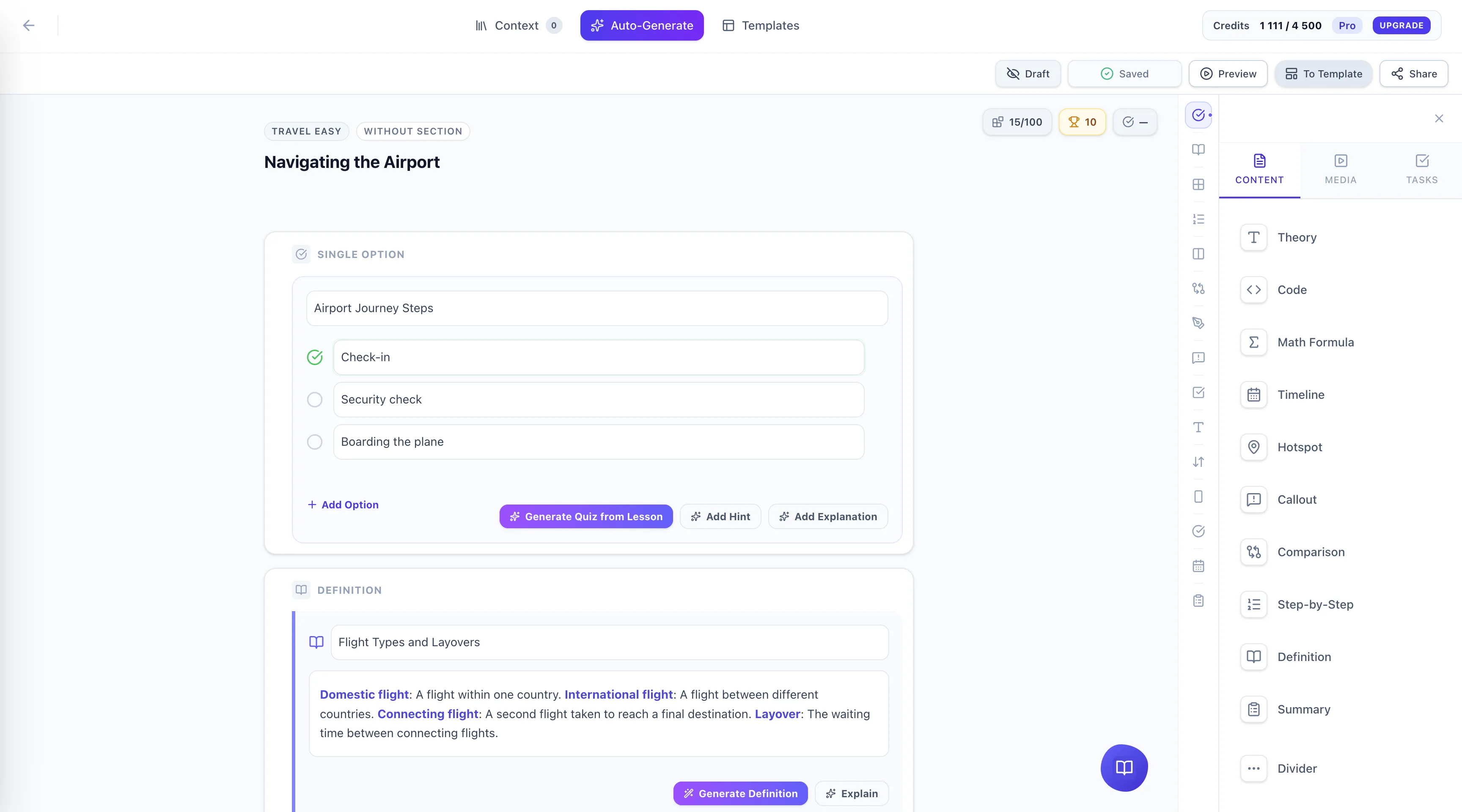
Demo
A short screen recording shows how a source file turns into a ready lesson right inside the editor.
Workflow
Add a PDF, Word document, text, or video as the source for the lesson.
Konspekt AI creates the lesson, questions, tests, and homework blocks.
Edit the content, check accuracy, and publish it for students.
Use cases
Konspekt AI fits how you already prepare lessons, whatever your teaching format looks like.
Prepare personal lessons faster and adapt materials for different students.
Standardize lesson quality and reduce manual preparation across teams.
Turn expert materials into structured modules, checks, and assignments.
Examples
Lesson
A clean sequence of explanations, examples, media, and student prompts.
Assessment
Questions generated from your source, ready for review and adjustment.
Analytics
See where students complete lessons and where they need more support.

About us
“Our goal is to make tutors' lives easier, make lesson prep simpler, and learning more effective.”
Dmytro Kovalchuk
Founder of Konspekt AI
Pricing
Start with the trial, then choose the amount of AI generation and storage your teaching workflow needs.
Credits are used when AI generates or improves lesson content. More credits mean more generated lessons, tests, and edits each month.
Free forever
Solo tutors & freelancers
The sweet spot
Online schools
Agencies & B2B
FAQ
Yes. Upload a PDF to the knowledge base or use it while creating a lesson. Konspekt AI indexes the content, finds the relevant fragments, and uses them to draft the lesson outline, explanations, quiz questions, and homework. You still review and edit the result before publishing, so the AI draft stays under teacher control.
Yes. The interface supports Ukrainian and English, and generated learning materials can be created in Ukrainian. Teachers can also keep source materials in Ukrainian or English and adjust the final wording in the lesson builder before students see it.
Credits are the monthly AI usage balance inside the platform. They are spent on actions such as generating a full lesson, regenerating a block, improving text, and processing larger source materials. Your plan defines how many credits are included each month, and the app shows usage so you understand what was spent.
Konspekt AI is designed for tutors, school teachers, online schools, and course teams that prepare structured learning materials. It is most useful when you already have source materials - PDFs, notes, presentations, documents, or videos - and want to turn them into lessons, checks, and assignments faster.
Yes. Every generated block remains editable: lesson text, quiz questions, tasks, and the order of sections. You can manually adjust the content, regenerate a specific block without replacing the whole lesson, and publish only when the material is ready for students.
Sources give the AI context. When you add files, links, or videos to the knowledge base, Konspekt AI can pull the most relevant fragments into lesson generation. Better, cleaner, and more up-to-date sources usually produce more accurate lesson drafts and fewer generic explanations.
The trial lets you test the core workflow before choosing a paid plan: create a limited number of lessons, try the lesson builder, add sources to the knowledge base within the trial limits, and see how generated materials can be edited. Content created during the trial is preserved when you upgrade.
Uploaded files are used to power your own lesson generation and knowledge base. They are not shown to other users. You can remove sources from the knowledge base when they are no longer needed. For sensitive materials, review your organization policies before uploading personal or confidential data.
Blog
Do your students "freeze" when faced with complex practical tasks? Discover how the Pretraining prin...
Want your students to finish your courses instead of dropping out after the first lesson? Discover h...
Tired of students mindlessly clicking through your assignments just to get them done? Discover what...
Are points, badges, and leaderboards failing to engage your students? Discover why the classic PBL t...
Are your students dropping out of video lectures halfway through and skimming long reads? Discover h...
Everyone tries to create learning materials using basic ChatGPT, only to get unstructured "walls" of...
Start with a free trial and see how much preparation time you can remove from your week.
Start for free